Streaming
Streamer mode
One switch that hides your email, devices, codes and other people's names while you are on air.
Streamer mode keeps your private details off the screen while you are on air. It is one switch: Settings → Streaming → Streamer mode. It applies to the computer you turn it on, not to your other devices.
What it hides
Your email, devices, codes, invite links and other people's names show as dots, with an eye button beside each one. The same goes for what you type into sign-in and code boxes: it hides as you type, the way a password does.
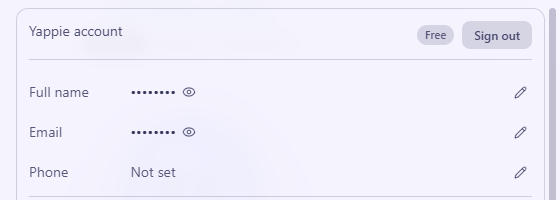
- The eye shows that one value for 30 seconds, and then it hides again. You can press it again sooner.
- Copy buttons still copy the real value, so you can paste a code without ever showing it.
The On air mark
While streamer mode is on, a small On air mark sits in the top bar. It is a button: click it to turn streamer mode off.
Other people
In the pop-out, other people show as their pet. A first name appears under the pet only if that person allows it. The switch is Show my first name on streams in Settings → Social, and it is on by default. While it is on, anyone who sees you in a study room or a co-focus on someone's stream sees your pet and your first name. Turn it off and they see only your pet. It works the same on the web.
What else changes
- The pop-out pins the countdown, so viewers can see the time. You can change the pin afterwards.
- Yappie's window title and tray say "Yappie", not your pet's name.
- Your pet's chat bubbles stay quiet in the pop-out.
Streamer mode doesn't change what you share with friends or groups. For that, see Privacy & cloud sync.
Last updated October 21, 2026