Streaming
Chat commands
Let your chat ask Yappie with !focus, !streak, !group and more, through the bot you already use.
Chat commands let your viewers ask Yappie a question in chat. They work with the chat bot you already have (Nightbot, StreamElements or Fossabot), so there is no new bot to add. Set them up in Settings → Streaming → Chat commands.
Set up
- Sign in to Yappie. Chat commands need an account.
- Pick your public handle in Your name in chat answers. It uses 3 to 25 lowercase letters, numbers or
_, and chat sees this name, never your real one. Press Save. If you change it later, the old one stops answering. - Turn on Share my status with chat. It is off until you turn it on. While it is on, Yappie tells our server whether you are focusing and how long is left, so your bot can answer.
- Under Study group for !group, !join and !constellation, pick the group you want on stream, or None.
- Under Your chat bot, choose Nightbot, StreamElements or Fossabot. Each command has a ready line and a Copy button.
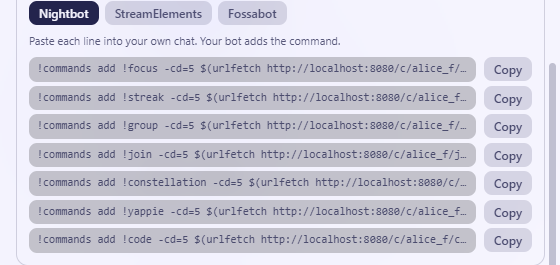
- Paste each line into your own chat, where your bot adds the command. For Fossabot, make a command with each name in your Fossabot dashboard, and paste its line as the response.
The commands
| Command | What chat sees |
|---|---|
!focus |
Whether you are focusing, paused or on a break, the time left, and your plan: "ati is focusing: 42 min left. (block 1 of 4, 50/10)" |
!streak |
Your focus streak: "ati is on a focus streak. Days in a row: 1." |
!group |
Who is focusing now in your chosen study group, and the group's total for today |
!join |
The link to join that group |
!constellation |
Tonight's hidden constellation, as the number of stars lit so far (never a percentage) |
!yappie |
One line about Yappie and your referral link |
!code |
For creators only: your live code and its redeem link |
Answers come in your language, in plain text, and never start with a command of their own. They are kept for a few seconds, so a busy chat doesn't flood the server. If sharing is off, or the handle is unknown, the answer is "Yappie can't find that streamer."
!code is only on the list for streamers who have a creator code linked to their account. Those codes are listed under Your creator codes in the same settings card, and are hidden while Streamer mode is on.
Which groups can be on stream
Your own group, or a public group. A private group that someone else runs can't be put on stream. !join gives out the invite link only where the group's owner lets members invite.
Good to know
- Nightbot waits between commands. The lines Yappie gives you use a 5-second cooldown, and Nightbot ignores a command typed less than about 5 seconds after the last one. If a command seems to do nothing, wait a moment and try again.
- Turning sharing off deletes the shared status. Nothing is sent while the switch is off.
- The StreamElements and Fossabot lines are generated the same way as Nightbot's, but we have tried only Nightbot on a real stream.
Last updated 2026년 10월 21일