Make it yours
Customize your pet
Name it, dress it, and see what levelling opens up next.
Your pet is the face of the whole app: it sits on the Focus tab, it becomes your taskbar icon, and it is what your friends see beside your name. Pet customization is where you decide what it looks like and what to call it.
Open pet customization
Open Pet customization from the menu (Desktop / Web) or the You tab (Mobile). On desktop you can also click your pet's name in the header to jump straight there.
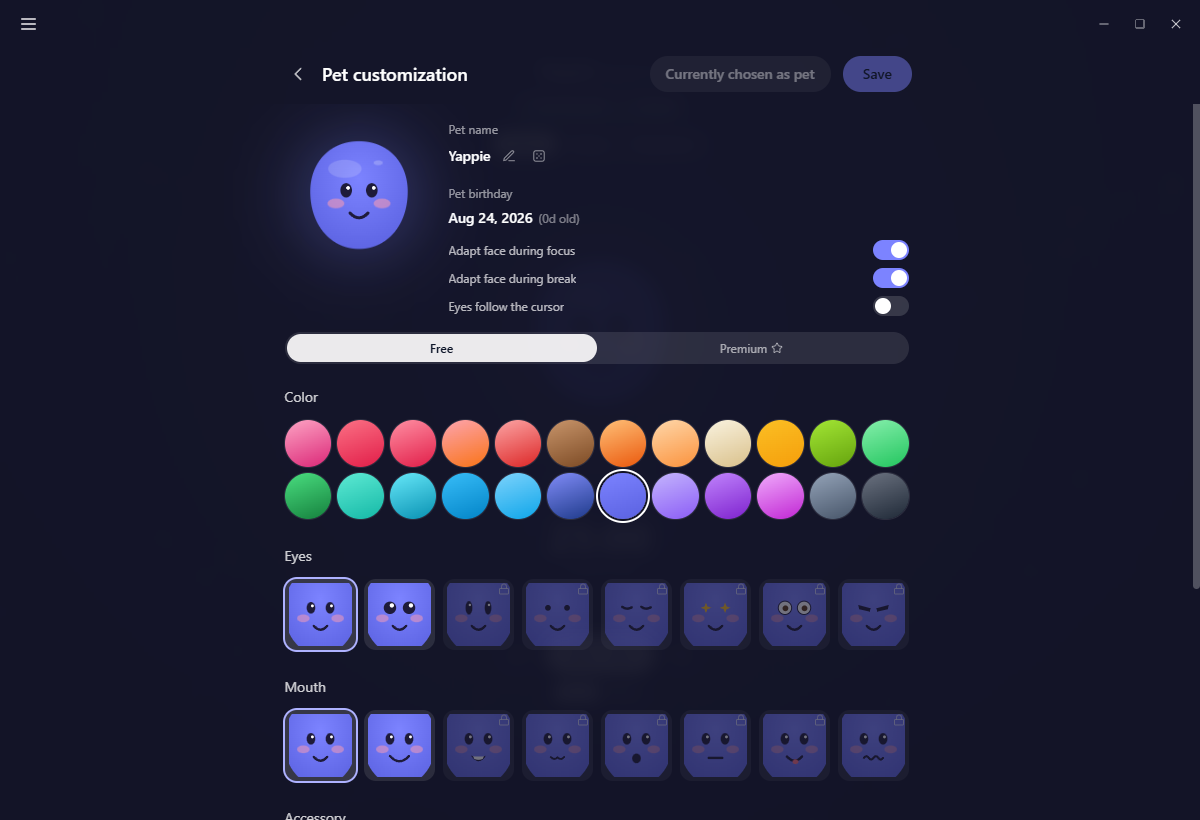
The page is one live preview with your pet's name, birthday and age beside it, then the pickers below. Save and Choose as pet sit in the title row at the top, so they stay in reach however far you scroll.
Name it
Your pet starts life as Yappie. To change that, click the pencil beside the name.
- Press Enter, or the check button, to save.
- Press Escape, or click anywhere else, to cancel. A name you did not confirm is not kept.
- Stuck for ideas? The dice rolls a suggestion. Each language has its own set of thirty names written for that language, not translated from English, so the Japanese list is genuinely cute in Japanese.
Names go through a friendliness check on your device, and again on the server when they sync. If an explicit name reaches your account it is reset, and you get a one-off note telling you what happened so it is never a silent change.
Birthday and age
Your pet's birthday is worked out for you: it is the earlier of the day you created your account and the first day you have a dated focus session on record. It only ever moves earlier, never later, so a device holding older history will correct it rather than reset it. Yappie's age is shown next to it.
Free and Premium
Two tabs split the pickers.
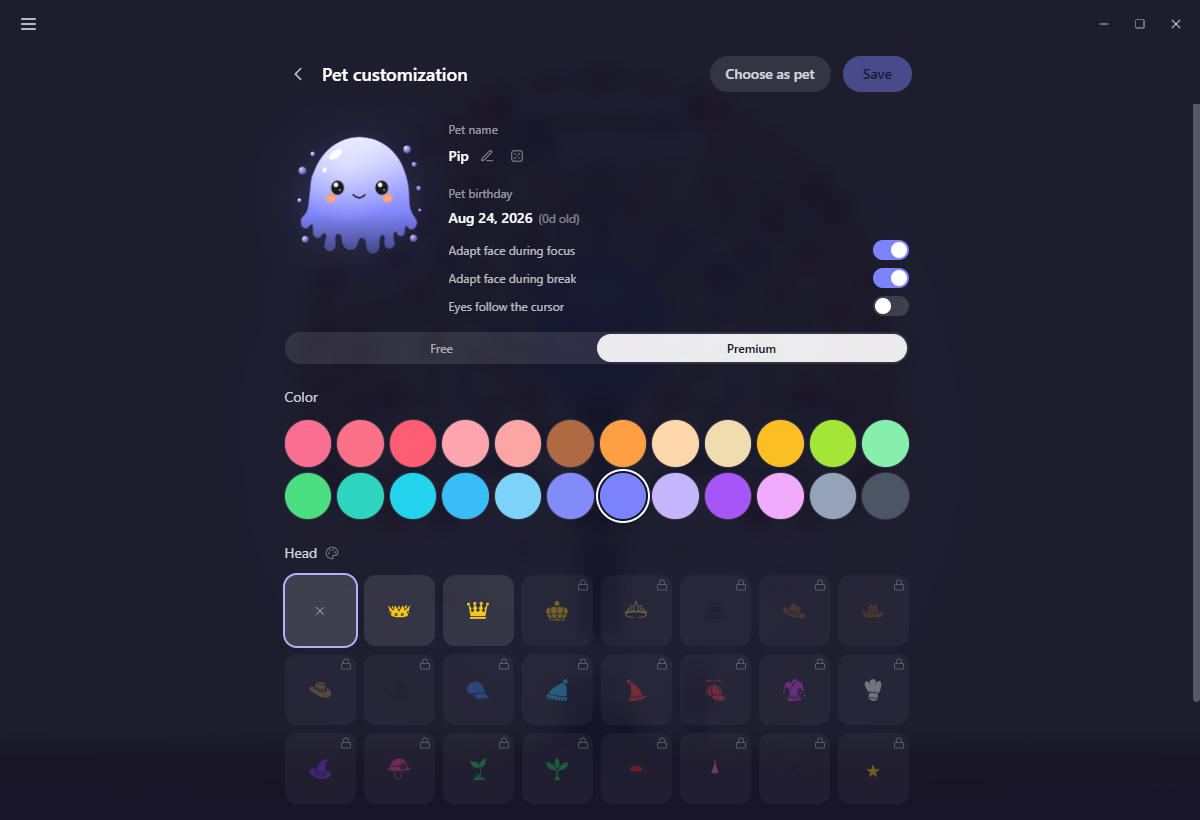
Free gives you the whole gradient pet: 24 body colours, 8 sets of eyes, 8 mouths and 15 accessories. Premium is a different pet entirely: a solid-colour body with a hat wardrobe and a glasses-and-others wardrobe, each with its own colour picker of fifteen swatches plus any custom colour you like.
The premium pet needs a paid plan, Lite or Super, either one. That includes its wardrobe: hats and glasses are not Super-only. On the Free plan you can still open the Premium tab and dress a pet up to see how it looks; you can't save it or wear it.
What unlocks, and how
This is the part people get wrong, so it is worth stating plainly: most of the wardrobe unlocks by levelling, not by paying.
- All 24 body colours are available from level 1. Nothing about colour is earned or sold. The free pet's whole palette is open on day one, and so is the premium pet's once your plan reaches it.
- Eyes, mouths and accessories start with one option each and open up one more per level.
- Hats and glasses open up two more per level, so the premium wardrobe fills in faster.
- A locked swatch wears a small padlock and tells you what it needs: "Reach level 12 to unlock."
- Whatever you are already wearing never locks, even if the rules around it change.
The one accessory outside all of this is Founder, which belongs to founding testers and is granted on the account rather than earned.
Levels come from focusing and finishing things. See Your Journey for how they add up.
Saving your changes
Edits sit in a draft while you work, marked with an Unsaved badge and an undo arrow beside the preview. Nothing reaches your account until you commit it.
- Save keeps the look you have been editing.
- Choose as pet saves it and makes that version, free or premium, the pet you actually wear. Once it is your active pet the button reads Currently chosen as pet.
Three small switches
Underneath the birthday sit three toggles. All three are device-local: they never sync, so turning one on for your laptop leaves your other machines alone.
- Adapt face during focus: let the expression shift while you're in a session.
- Adapt face during break: the same, for breaks.
- Eyes follow the cursor: off by default. Turn it on and your pet watches your mouse when it comes near. See Playing with Yappie for what that looks like.
On mobile
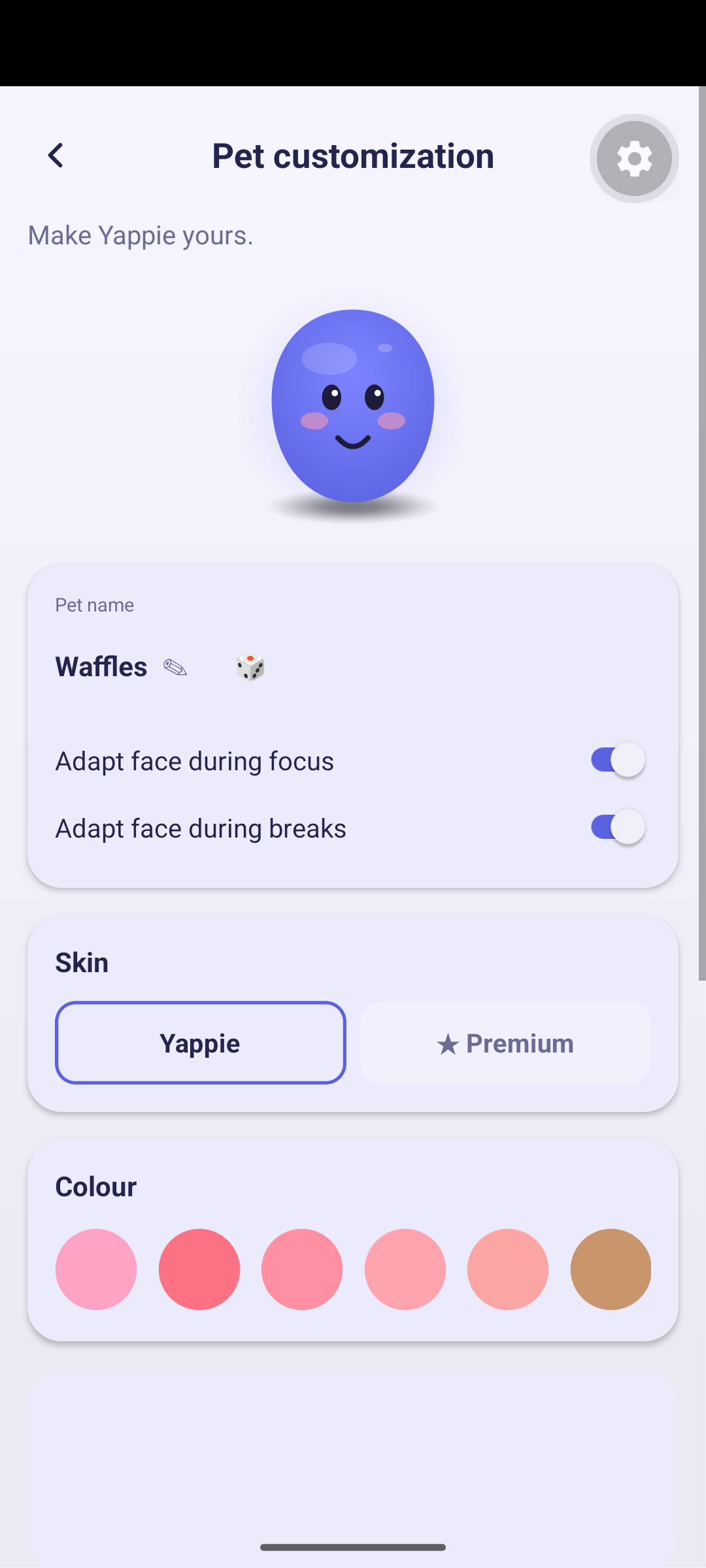
The layout differs, the choices do not. Colour, eyes, mouth and accessories are horizontally scrolling swatch strips, so you swipe along each row instead of scanning a grid. The dice and the adapt-face toggles are there too. "Eyes follow the cursor" is not, for the obvious reason.
Your pet is your app icon
Whenever you choose or restyle your pet, Yappie takes a picture of it and uses that as the app's icon in your taskbar or dock, and as the tray icon too. Restyle it and the icon changes with it.
Next: Playing with Yappie covers what happens when you actually touch it. Backgrounds and Themes handle everything around the pet, and Plans lists what each plan includes.
Last updated October 21, 2026