Focus & tasks
Unsorted focus
The bank that catches every minute of focus that had no task attached.
Sometimes you start working before you have decided what to call it. Unsorted focus is where that time waits. It is Yappie's promise that real work is never thrown away for want of a task to attach it to.
What lands in the bank
Four things feed it, and all four used to be ways of losing time:
- Focus with nothing attached. The minutes go straight in.
- Stopping a session early with nothing attached. The elapsed minutes go in.
- Un-ticking or deleting a task that a real focus session completed. The measured time moves here instead of vanishing.
- Editing a done task's logged time downward. Whatever you took off comes back to the bank.
The one thing that does not come here is time you only typed in as an estimate and ticked by hand. That never happened on a clock, so it comes off again.
Finding it
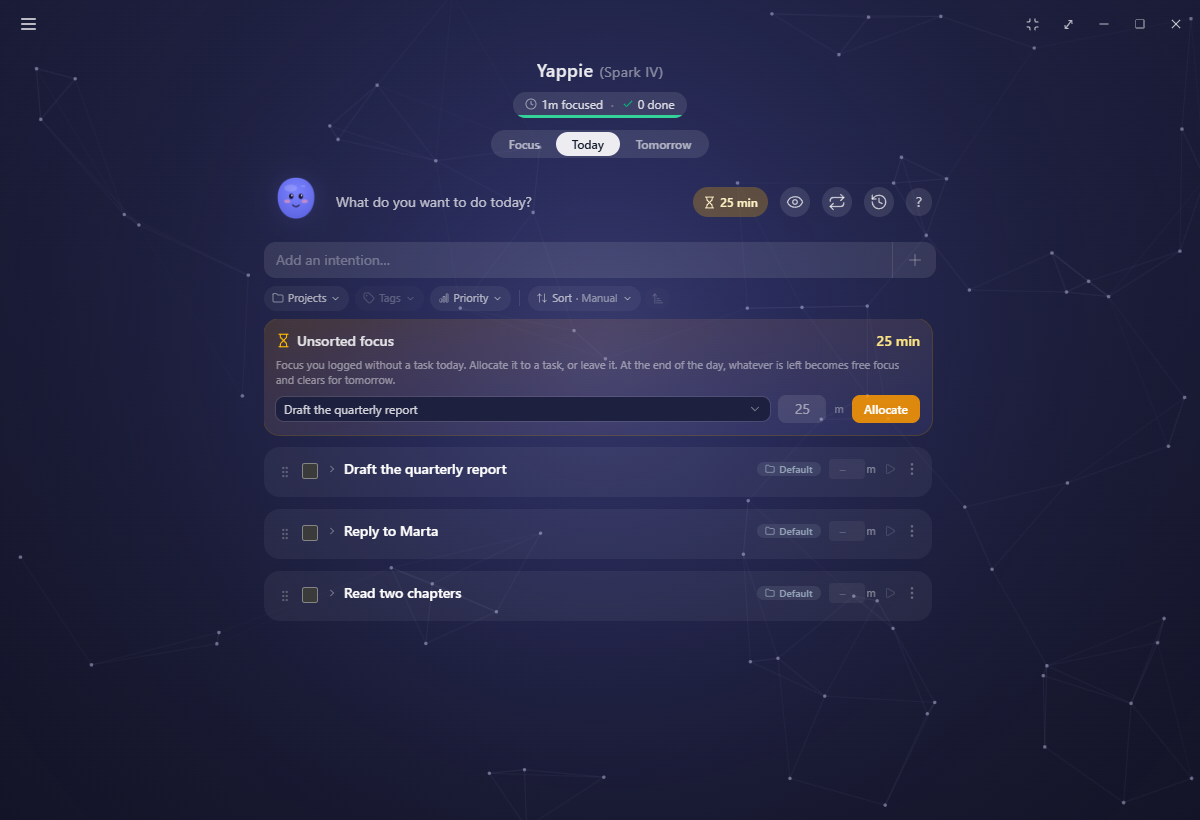
Once you have at least a minute banked, an amber N min pill appears in the Today header. Click it and the Unsorted focus card opens above the list.
Spending it
From the card you can:
- Pour minutes onto a task or a step. Pick a target, set the amount, and allocate. The amount you enter becomes that item's time, and allocating completes it.
- Create a task for the time. Type a name and Yappie makes the task, credits it and ticks it in one go.
- Leave it. Nothing is lost by doing nothing.
Whatever is still in the bank at the end of the day becomes plain free focus on your charts, and the bank clears for tomorrow. It counted the whole time. It never got a name, that is all.
Allocating more than you have is refused, kindly: "Not enough Unsorted focus for this task. Add more focus, lower the task's time, or split it into parts you can cover."
The same guard works in the other direction. When a done task's logged time came from the bank, editing that number up draws the difference back out of the bank, and Yappie says so rather than inventing minutes it does not have.
If you sort time onto a step that was deleted on another device, the minutes stay in the bank rather than crediting nothing.
Yesterday, for thirty minutes
You will not always sort things out before midnight. So for 30 minutes after the day rolls over, the card grows a second tab: Yesterday, with how much is left and how long you have to use it.
That tab lists yesterday's archived tasks, not today's, because that is the work the time actually belonged to. Sorting minutes onto one of them also marks that history row done. A grace item that already has a time set has to be covered in full: you cannot rewrite yesterday with a partial number.
Two details that catch people out:
- The window is anchored to the day rollover itself, not to when you opened the app. Opening Yappie at lunchtime does not hand you a fresh thirty minutes.
- If yesterday had no recorded tasks at all, the tab says so and points you back to the Today tab. The time stays free focus.
On a rest day the countdown is dropped from the label. The bank is still sortable whenever you feel like it, because resting should not come with a clock ticking.
Related
- Focus sessions explains stopping early and the split into done and remaining parts.
- Today is where the pill lives and where the tasks come from.
- History holds the archived days the grace tab writes to.
Last updated October 21, 2026