Growth & rewards
Hall of Glory
Sixteen categories of badges, each with a line on how you earn it, that flip over to show the day you earned them.
The Hall of Glory is a wall of badges that celebrates the many small ways you show up. Each one is a dated keepsake of a moment worth remembering.
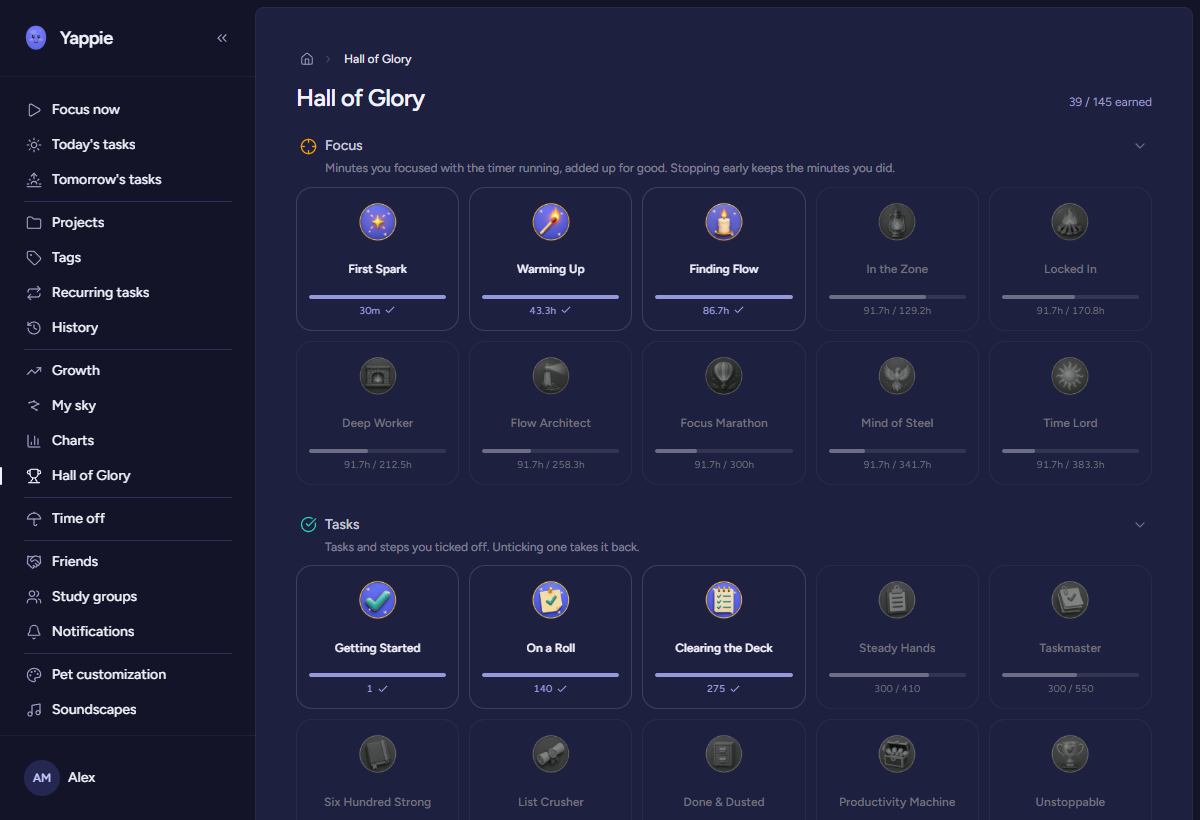
Sixteen categories
Badges are grouped into categories you can roll open and shut. Each has its own coloured icon, and under its name a single line that says exactly how you earn it. In the order they sit on the wall:
- Focus: Minutes you focused with the timer running, added up for good. Stopping early keeps the minutes you did.
- Tasks: Tasks and steps you ticked off. Unticking one takes it back.
- Sessions: Focus sessions you finished. Finishing counts; how long they were does not.
- Streak: Your longest run of days with at least 15 minutes of focus. A frozen day and a declared day off both keep the run alive.
- Hydration: Each time you answer a water nudge to say you drank. Nudges are switched on under Wellbeing.
- Movement: Minutes of movement you logged yourself as physical activity. Your own word is enough.
- Rest: Minutes of breaks you took, whether Yappie timed them or you logged them yourself. Rest counts as progress here, not as a gap.
- Social: Real-life time with people, which you logged yourself. Nothing you do inside the app counts here.
- Co-focus: Minutes you focused with someone else in the same session: a friend one on one, a matched stranger, or a study room.
- Study groups: Minutes you focused while sitting in a group room. Only time actually in the room counts, the same rule the group total uses.
- Commitment: Weekly commitments you kept in a study group: you committed to hours for the week and did at least that many.
- Bond: Days you opened Yappie, counted once a day. A missed day does not reset it.
- Skies: Constellations you discovered alone, with a friend, or with a study group.
- Cheers: Cheers you sent to friends. One a day per friend counts.
- Time off: Declared time off: your first rest day, a getaway planned ahead, and coming back after a leave.
- Founder: Given to founding testers. Not earned; granted.
Fourteen of them run ten badges deep, so there is always a next step at your own pace. Two are different:
- Time off holds four: A Day for You, Getaway Planned, Welcome Back and Rested & Returned.
- Founder holds one, Founding Tester, which is granted rather than earned.
Your level is not on the wall: the Journey is where levels live. Skies you finished on your own before the Skies row existed already count toward it.
The header carries an X / Y earned count at its right edge.
Locked and earned
A badge you have not reached yet is not scolding you. It shows its name, a greyed picture, a progress bar and the plain numbers, in whatever the badge counts: tasks, hours, days, glasses of water, skies.
An earned badge shows its picture in full colour, and a few small gold stars twinkle quietly inside it. Point at an earned badge and it turns over to show exactly when you got it: Achieved on July 16, 2026 at 10:54pm. Click any badge, earned or not, to see it large, with its name, what it is for, and when you earned it or how far along you are. Badges earned before Yappie started recording times show the date alone.
If your system asks for reduced motion, the stars stay still and hidden, and the card reveals the date without the spin.
There is no penalty for a badge you have not earned. The unearned ones wait, quietly, for whenever you get there.
The moment you earn one
Unlocking a badge raises a drawer from the bottom of the window with confetti, the badge itself, the line that says how you earned it, and a View in Hall of Glory link.
It is polite about timing. Celebrations never land over a running focus session, never during first-run setup, and never on top of another drawer. If several things happen at once they queue and play one at a time, so you get each moment rather than a pile of them.
Showing your badges to other people
Whether other people can see your earned badges is a row in Settings → Social, not here. It sits in the same grid as everything else you can share, with a separate column for friends, private groups and public groups.
By default your badges are visible to friends and to private groups you are in, and hidden from public groups. Turn any of those off and your wall goes back to being yours alone.
Finding the Hall
- Desktop: open Hall of Glory from the menu, or follow View in Hall of Glory from an unlock.
- Mobile: the Glories segment of the Progress tab.
- Web: Hall of Glory in the sidebar.
Study groups keep a Hall of Glory of their own, for things the whole group did together. See Study groups.
Next: Taking time off for the four rest badges, My sky for the constellations behind the Skies row, and Growth for the numbers most of these badges are counting.
Last updated 21 de outubro de 2026