Streaming
The Yappie bot (Twitch)
Connect Twitch so Yappie can post in chat, add stream markers and react to your viewers.
The Yappie bot is a shared account that posts in your Twitch chat. Yappie can also add stream markers and let your pet react to your viewers. You set it up in Settings → Streaming → Twitch.
Connect Twitch
- Press Connect Twitch. Twitch opens in your browser.
- Allow every permission Twitch asks for. If one is missing, Yappie asks you to connect again.
- Go back to Yappie. It says "Connected as" followed by your channel name, and tells you whether your stream is live or waiting.
Make the bot a moderator, once
Twitch holds back messages from a brand-new bot until it is a moderator. In your own Twitch chat, type:
/mod yappiebot
You only do this once. Yappie reminds you beside the connect button, with a Copy button for the line. If Twitch ever holds one of the bot's messages, Yappie shows a note telling you the same.
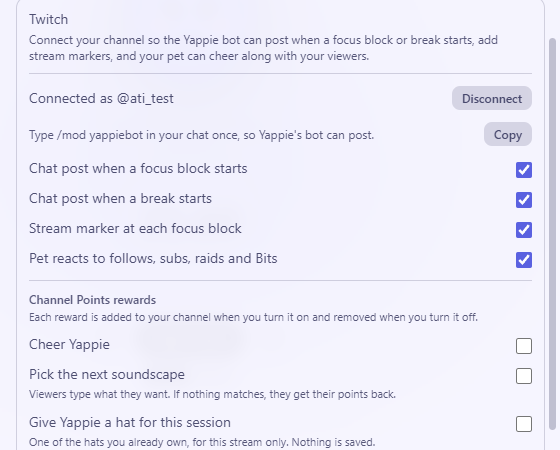
The switches
Each one can be turned off on its own.
- Chat post when a focus block starts. The bot posts something like "Focus block 2 of 4 started, 50 min. Type !join to focus along." The "!join" part appears when you have a study group on stream.
- Chat post when a break starts. For example "Break: 10 min."
- Stream marker at each focus block. A marker named "Focus 2 of 4", handy as chapters in your past broadcasts. Twitch only makes markers while you are live, and only when Store past broadcasts is turned on in your Twitch channel settings.
- Pet reacts to follows, subs, raids and Bits. The pet on your stream overlay and in the pop-out celebrates, then goes back to what it was doing. No viewer names are shown.
These switches belong to the computer you set them on. Chat posts are written in your chat language, one for each change.
Channel Points rewards
Yappie can add three rewards to your channel. Each one is added when you turn it on and removed when you turn it off.
- Cheer Yappie. Your pet celebrates.
- Pick the next soundscape. Viewers type what they want, like rain or forest. It only works if you use soundscapes on stream.
- Give Yappie a hat for this session. One of the hats you already own, for this stream only. Nothing is saved or unlocked.
If a reward can't happen (for example, no soundscape matches), the viewer gets their points back.
Channel Points need Twitch Affiliate or Partner. If your channel is neither, Yappie says so and the rewards can't be turned on.
Disconnect
Press Disconnect to remove the link. Yappie then stops posting, adding markers and reacting. You can connect again at any time.
Last updated 21 अक्टूबर 2026