Privacy & plans
Referrals
Invite a friend, and once they have reached the focus minimum you each get a token.
Bring somebody into Yappie and you both get a token, and a token is a month of a paid plan. It is the one way to reach Lite or Super without paying for them. This page explains the wallet, what makes a referral count, and what tokens are worth.
Your wallet
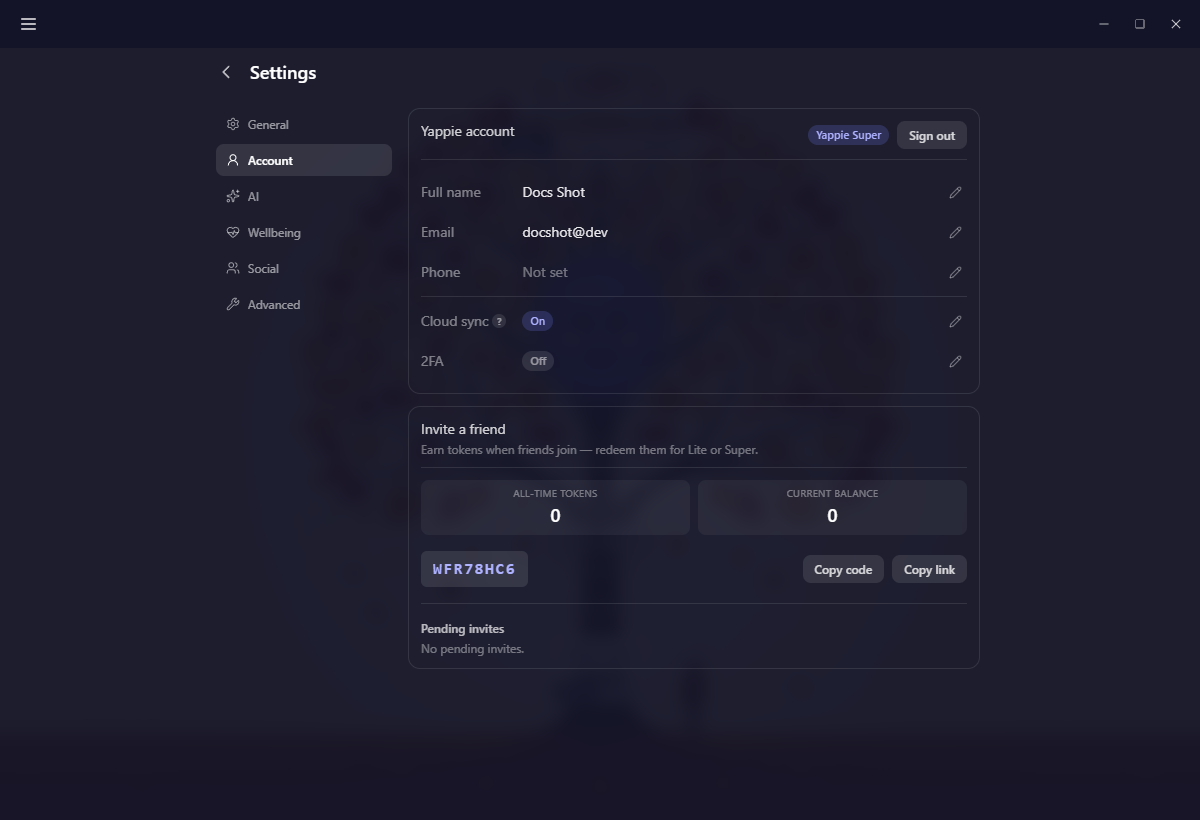
The wallet lives in Settings → Account, in a card called Invite a friend, under the account details. It holds:
- All-time tokens and Current balance, side by side
- Your referral code, with Copy code and Copy link beside it
- The redeem form, once you have at least one token to spend
- Pending invites, with what each one is still waiting on
The link is your code on the end of the Yappie site, so it works anywhere you can paste a link. Send either; the code and the link do the same job.
Your referral code is not the same thing as the invite code on the Friends page. That one adds somebody as a friend. This one credits you when a new person joins because of you.
What makes a referral count
A click is not a referral. Yappie waits until your friend has actually started using it, which means two things:
- Their email is verified.
- They have reached the focus minimum, counted across all their sessions.
The minimum is a setting we can adjust, so the number is not written here. Your wallet always shows the one in force.
When both clear, one token goes to you and one goes to your friend, at the same moment. There is no cap on how many you can earn, and tokens never expire.
Until then the invite sits under Pending invites with a small amber label saying what is missing: one for the email, and one for the focus that names the minimum in minutes. Their email is shown masked, so you can tell your invites apart without the wallet putting anyone's address on screen. Two quiet anti-fraud checks run alongside those two, and they can appear in the same place if something looks off.
Spending tokens
The redeem form appears as soon as your balance reaches one. Pick a plan and a number of months, then Redeem:
- Lite costs one token a month
- Super costs three tokens a month
You can redeem up to twelve months at a time, and a month here is 30 days. If you already have paid time on your account, the new window queues after it rather than overlapping: Super extends from the end of your current Super, and Lite waits until any Super you hold has run out, since only one plan can be in effect at a time.
Redeeming takes effect straight away, and your plan badge in Settings → Account updates with it.
The invite bubble
Now and then a small thought cloud drifts over your pet suggesting you invite a friend, and mentioning that you would both get a free month. It is deliberately shy:
- Signed-in accounts only, and only in the main window, never the pop-out
- At most once a day, and never in the first hour after you open the app
- Never during a focus session, a celebration, or while a page is open over the top
- Quiet on a rest day, along with every other bubble
Its buttons are Later, Don't show again and Invite a friend. Later hides it until tomorrow. Invite a friend takes you to the wallet, and because you have found it, the bubble stops appearing after that. Don't show again stops it immediately. Both of those are remembered on the device you pressed them on.
Getting started
- Open Settings → Account and copy your code or your link.
- Send it to somebody who would like a calmer way to work.
- When they verify their email and reach the focus minimum, you each get a token.
- Redeem tokens for Lite or Super whenever it suits you.
Plans covers what those months actually buy you, and Privacy & cloud sync is the neighbouring page in this section.
Last updated Oktubre 21, 2026