Study with me, co-working and body doubling streams
Focus together with your community, live.
A Pomodoro timer overlay for OBS and a study group your viewers join. They study, write or work beside you, show up on screen as pets, and get things done together.
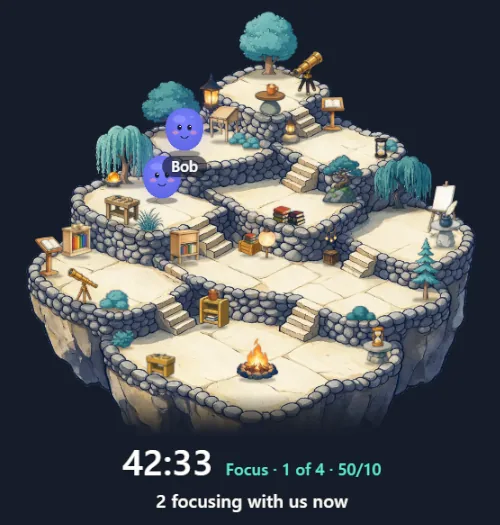
What your community gets
Plenty of people come to a stream to get something done, because company makes starting easier. Here is what Yappie gives them.
A place to keep going after the stream
Your study group stays open. Members can focus together any time, not only while you are live.
They see themselves on stream
Their pets show up on your overlay, with a first name only if they allow it.
A reason to come back
The group's daily goal and the constellation you build together are always there to check on tomorrow.
Chat that answers itself
!focus tells latecomers how long is left, and !join brings them in.
Free for every viewer. Groups, friends and focusing together cost nothing.
What you get as a creator
Yappie is free to use. Creators we work with get a little more.
Featured on the Yappie website
Your own page with your channels, your schedule and your study group, so people looking for a study-with-me stream can find you.
Creator codes for giveaways
Give your viewers months of Yappie Lite or Super. !code puts the live one in chat.
A direct line to us
You talk to the people who make Yappie, and your feedback shapes what comes next.
Early access to new stream features
Try what is new for streaming before it reaches everyone else.
How Yappie fits your stream
It all runs on your own computer, in the desktop app. Use as little or as much as you like.
The pop-out, in OBS
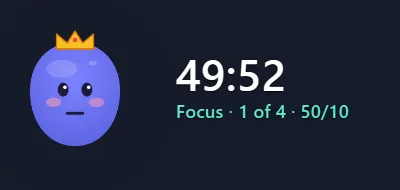
Yappie has a small pop-out window with your pet and the timer. Capture it in OBS with Window Capture and the background is see-through, so it sits right on your scene. It works for any platform you stream to from OBS.
The stream overlay
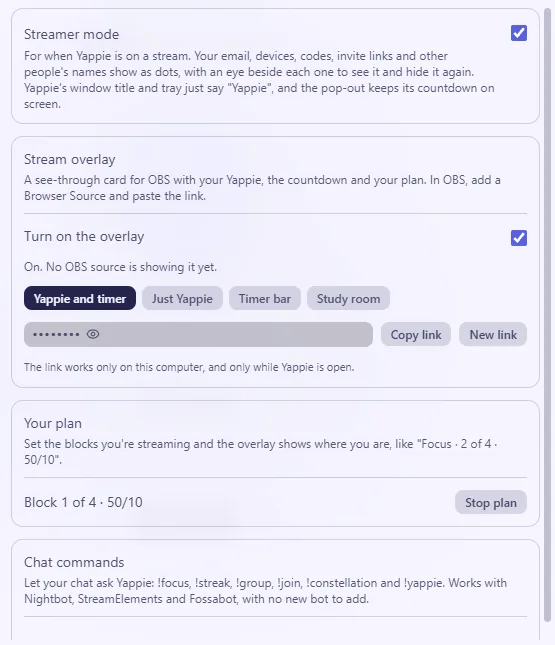
Prefer a Browser Source? The desktop app serves one on your own computer. It shows your pet, the timer and your plan, like "Focus 2 of 4 · 50/10", and it knows when you are on a break.
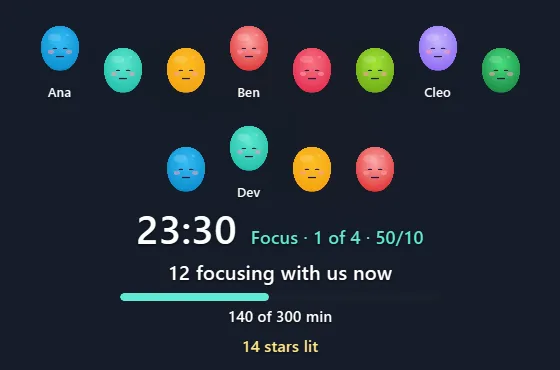
Choose the study room layout and your viewers join the picture: the pets of everyone focusing in your group, "N focusing with us now", the group's goal for the day and tonight's stars.
Streamer mode
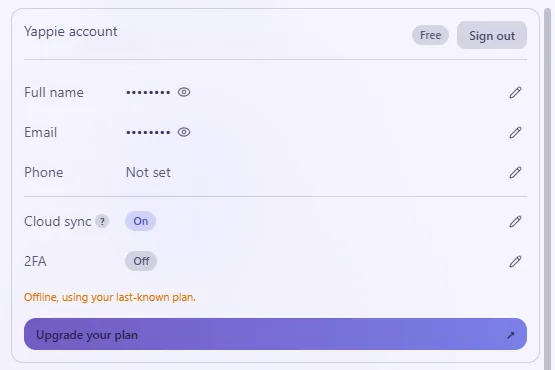
One switch shows every personal detail in the app as dots, with an eye button to peek when you want to. Other people show up as their pet, and with a first name only if they allow it.
Your viewers join in
Your study group is where your community gathers.
- 1
Start a study group
Make one in Yappie for your channel.
- 2
Viewers type !join
Chat is shown the way in, and viewers join your group.
- 3
Focus together
Members focus in the group's study room, and you see them on your overlay.
- 4
Goals and a constellation
The group has a daily goal and builds a hidden constellation together.
Chat commands
Let chat ask Yappie with !focus, !streak, !group, !join, !constellation, !yappie and !code. They work through Nightbot, StreamElements or Fossabot, so there is no new bot to add. They stay off until you turn them on.
Creator codes for giveaways
A creator code gives your viewers months of Yappie Lite or Super. Run a giveaway, and !code puts the live code in chat.
On Twitch, a little more
Connect your channel and the Yappie bot joins in.
- It posts in chat when a focus block or a break starts.
- It adds stream markers at those moments, handy for chapters.
- Your pet reacts to follows, subs, raids and Bits.
- Three Channel Points rewards are ready for Affiliates and Partners.
Questions streamers ask
Ready to set it up?
The setup guide covers OBS, the overlay, chat commands and Twitch, step by step.
Apply now
Tell us a little about your stream and we will get in touch personally.